ACE BASIC - Closures MUI and More
Picking up where we left off
The previous two posts covered ACE BASIC v2.5 (AGA screen support) and v2.6 (GadTools gadgets, ASSERT, 68020 code generation). Development has not slowed down. Versions 2.7 and 2.8 bring functional programming features, a high-level MUI interface, Lisp-style linked lists, double-buffered graphics, and CubicIDE integration. There is a lot of ground to cover, so let's get started.
Closures and Function Pointers
The biggest language addition in v2.7 is support for function pointers, partial application, and closures. These are the building blocks for higher-order programming -- passing behavior around as data.
Function references and INVOKE
The @ operator takes a reference to a SUB and returns an address you can store and call later with INVOKE:
DECLARE SUB Hello

funcPtr& = @Hello
INVOKE funcPtr&

SUB Hello
  PRINT "Hello from a function pointer!"
END SUB
@Hello produces a long integer that holds the address of the Hello subroutine. INVOKE funcPtr& calls whatever SUB that address points to. This is the simplest form -- no arguments, no return value, just indirect dispatch.
BIND and partial application
Things get more interesting with BIND. It captures a function reference together with one or more arguments, producing a closure that remembers the bound values:
DECLARE SUB LONGINT AddN(LONGINT n, LONGINT x)

adder& = BIND(@AddN, 5)
result& = INVOKE adder&(10)
PRINT result&               '..prints 15

SUB LONGINT AddN(LONGINT n, LONGINT x)
  AddN = n + x
END SUB
BIND(@AddN, 5) creates a closure that captures 5 as the first argument to AddN. When you INVOKE adder&(10), it calls AddN(5, 10) and returns 15. The bound value is captured at bind time -- if you change the variable later, the closure still sees the original value.
This is partial application (sometimes called currying). You fix some arguments now and supply the rest later.
Returning closures from SUBs
You can create closures inside a SUB and return them to the caller. This is the classic "factory" pattern:
DECLARE SUB LONGINT AddN(LONGINT n, LONGINT x)
DECLARE SUB LONGINT MakeAdder(LONGINT n)

add5& = MakeAdder(5)
result& = INVOKE add5&(10)
PRINT result&               '..prints 15

SUB LONGINT MakeAdder(LONGINT n)
  MakeAdder = BIND(@AddN, n)
END SUB

SUB LONGINT AddN(LONGINT n, LONGINT x)
  AddN = n + x
END SUB
MakeAdder(5) returns a closure that adds 5 to whatever you pass it. The local variable n is captured by value inside the closure, so it survives after MakeAdder returns.
The INVOKABLE keyword
Version 2.8 adds the INVOKABLE keyword for SUBs that are meant to be used as callbacks -- particularly for the List library's higher-order functions and similar patterns where closures are passed as ADDRESS parameters:
DECLARE SUB LONGINT Transformer(LONGINT v) INVOKABLE

cb& = BIND(@Transformer)
result& = MapValue(cb&, 7)
PRINT result&               '..prints 14

SUB LONGINT Transformer(LONGINT v) INVOKABLE
  Transformer = v * 2
END SUB

SUB LONGINT MapValue(ADDRESS cb, LONGINT in)
  MapValue = INVOKE cb(in)
END SUB
When a closure is passed as a generic ADDRESS parameter (as cb in MapValue above), the compiler cannot know at compile time whether it points to a plain SUB or a closure with bound arguments. INVOKABLE generates the calling convention that allows INVOKE to detect this at runtime and do the right thing. Without it, passing a closure as a callback could silently produce wrong results.
Lisp-Style Linked Lists
Closures become genuinely useful when you have data structures that accept callbacks. Version 2.8 ships a List submodule that implements Lisp-style linked lists built from cons cells. Each cell holds a typed value (integer, long, single, string, or nested list) and a pointer to the next cell.
Building lists
The builder pattern provides a clean way to construct lists:
#include <submods/list.h>

ADDRESS myList

LNew
  LAdd&(10)
  LAdd&(20)
  LAdd&(30)
myList = LEnd
LNew starts a new list, LAdd& appends a long integer value, and LEnd returns the finished list. The & suffix indicates the type -- LAdd% for integers, LAdd! for singles, LAdd$ for strings, LAddList for nested lists.
You can also build lists directly with LCons& (prepend) or LSnoc& (append), but the builder pattern reads more naturally for most cases.
Higher-order functions
The real payoff is the set of higher-order functions that operate on lists using closures:
DECLARE SUB ADDRESS DoubleValue(ADDRESS carVal, SHORTINT typeTag) INVOKABLE
DECLARE SUB SHORTINT IsEven(ADDRESS carVal, SHORTINT typeTag) INVOKABLE
DECLARE SUB ADDRESS SumValues(ADDRESS acc, ADDRESS carVal, SHORTINT typeTag) INVOKABLE

ADDRESS nums, doubled, evens

'..Build a list: (1 2 3 4 5 6)
LNew
  FOR i% = 1 TO 6 : LAdd&(i%) : NEXT i%
nums = LEnd

'..Map: double every element -> (2 4 6 8 10 12)
doubled = LMap(nums, BIND(@DoubleValue))

'..Filter: keep only even numbers -> (2 4 6)
evens = LFilter(nums, BIND(@IsEven))

'..Reduce: sum all elements -> 21
LONGINT total
total = LReduce(nums, BIND(@SumValues), 0&)

LFree(nums)
LFree(doubled)
LFree(evens)

SUB ADDRESS DoubleValue(ADDRESS carVal, SHORTINT typeTag) INVOKABLE
  LONGINT lngVal
  lngVal = carVal
  DoubleValue = lngVal * 2
END SUB

SUB SHORTINT IsEven(ADDRESS carVal, SHORTINT typeTag) INVOKABLE
  LONGINT lngVal
  lngVal = carVal
  IsEven = (lngVal MOD 2 = 0)
END SUB

SUB ADDRESS SumValues(ADDRESS acc, ADDRESS carVal, SHORTINT typeTag) INVOKABLE
  LONGINT accLng, valLng
  accLng = acc
  valLng = carVal
  SumValues = accLng + valLng
END SUB
Every callback receives the cell's raw value as ADDRESS carVal and a type tag as SHORTINT typeTag. The type tag tells you what kind of value the cell holds (LTypeInt, LTypeLng, LTypeSng, LTypeStr, LTypeList). Since our list contains only long integers, the callbacks here just cast carVal to LONGINT directly. A generic callback would dispatch on typeTag to handle multiple types -- the test suite in the repository shows that pattern.
LMap applies a callback to every element and returns a new list. LFilter returns a new list containing only elements for which the callback returns non-zero. LReduce folds the list into a single value using an accumulator. All three take a BIND(@callback) closure, which is where the INVOKABLE keyword matters.
The submodule also provides LForEach for side-effecting iteration, and destructive variants LNmap and LNfilter that modify the list in place. The full API is documented in the List submodule README.
MUI Support
MUI (Magic User Interface) is the standard third-party GUI toolkit on the Amiga. It provides object-oriented widgets with automatic layout, font sensitivity, user-customizable appearance, and a consistent look across applications. Most serious Amiga applications from the mid-1990s onward use MUI.
Version 2.7 adds a MUI submodule that wraps the raw MUI API into builder-style calls. To appreciate what it does, consider the alternative.
The raw approach
Programming MUI directly from ACE BASIC means working with tag arrays and MUI_NewObjectA calls. A minimal "Hello World" window takes around 150 lines of code: you allocate tag items, fill in tag IDs and values, create each MUI object by hand, set up notifications with DoMethodA, run the event loop, and dispose everything. The SimpleMUI.b example in the repository shows this approach in full.
The submodule approach
With the MUI submodule, the same program fits in about 30 lines:
#include <submods/MUI.h>

LIBRARY "intuition.library"
LIBRARY "utility.library"

ADDRESS app, win, grp, txt

MUIInit

txt = MUITextCentered("Hello from MUI!")

MUIBeginVGroup
    MUIGroupFrameT("Welcome")
    MUIChild(txt)
grp = MUIEndGroup

win = MUIWindow("Hello MUI", grp)
app = MUIApp("HelloMUI", "$VER: HelloMUI 1.0", win)

IF app <> 0& THEN
    MUINotifyClose(win, app, MUIV_Application_ReturnID_Quit)
    MUIWindowOpen(win)

    WHILE MUIWaitEvent(app) <> MUIV_Application_ReturnID_Quit
    WEND

    MUIDispose(app)
END IF

MUICleanup

LIBRARY CLOSE "utility.library"
LIBRARY CLOSE "intuition.library"
MUIInit opens muimaster.library. MUITextCentered creates a text object. MUIBeginVGroup/MUIEndGroup define a vertical layout group. MUIWindow and MUIApp wrap the objects into a window and application. The event loop calls MUIWaitEvent which blocks until something happens and returns an event ID. MUIDispose frees the entire object tree.
The pattern for buttons is similarly concise -- create them with MUIButton, set up click notifications with MUINotifyButton, and dispatch on event IDs in the loop.
The submodule currently provides wrappers for text, buttons, string and integer input fields, checkmarks, cycle gadgets, radio buttons, list views, horizontal and vertical groups, menus, tabs, and hooks. That covers most typical application GUIs.
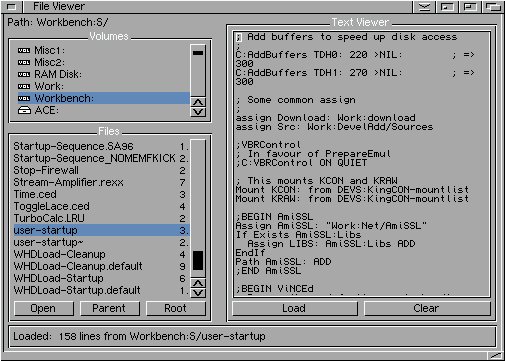
Here is a screenshot of the MUI File Browser example -- a more complete application built with the submodule:
Double-Buffered Graphics
When you draw directly to the visible framebuffer, the display can update mid-frame and show a partially drawn image. This is screen tearing, and it ruins any kind of smooth animation.
The classic solution is double buffering: draw to a hidden back buffer, then swap it with the visible front buffer during the vertical blank interval. Version 2.7 includes a DoubleBuffer.h include file that implements this entirely in ACE BASIC -- no compiler changes were needed.
How it works
On the Amiga, the hardware displays whatever bitmap the ViewPort's RasInfo points to, and drawing commands go to whatever bitmap the RastPort points to. Double buffering exploits this separation:
DbufInitallocates a second bitmap withAllocBitMap(matching the screen's dimensions and depth) and redirects the RastPort to draw into it.DbufSwapmakes the back buffer visible by updatingRasInfo->BitMapand callingScrollVPortto regenerate the copper list, thenWaitTOFto sync with the vertical blank. Drawing is then redirected to the previously-displayed buffer.DbufCleanuprestores the original bitmap and frees the allocated memory.
The bitmap pointer swaps are done with POKEL -- direct memory writes to the RastPort and RasInfo structures at their documented offsets.
The bouncing ball demo
Here is the core animation loop from examples/gfx/dbuf_demo.b:
#include <ace/DoubleBuffer.h>

SCREEN 1,320,256,4,1
WINDOW 1,,(0,0)-(320,256),32,1

DbufInit

IF NOT DbufReady THEN
  PRINT "Failed to allocate back buffer!"
  WINDOW CLOSE 1
  SCREEN CLOSE 1
  STOP
END IF

SINGLE bx, by, dx, dy
bx = 160 : by = 128 : dx = 3 : dy = 2

WHILE INKEY$ = ""
  LINE (0,0)-(319,255),0,bf         '..clear back buffer
  bx = bx + dx : by = by + dy

  IF bx - 15 < 0 OR bx + 15 >= 320 THEN dx = -dx : bx = bx + dx
  IF by - 15 < 0 OR by + 15 >= 256 THEN dy = -dy : by = by + dy

  CIRCLE (CINT(bx), CINT(by)), 15, 2,,,,F   '..filled ball
  CIRCLE (CINT(bx), CINT(by)), 15, 1        '..outline

  COLOR 3
  LOCATE 1,1
  PRINTS "Double Buffer Demo - Press any key"

  DbufSwap                           '..swap and sync
WEND

DbufCleanup
WINDOW CLOSE 1
SCREEN CLOSE 1
Each frame: clear the back buffer, update positions, draw, swap. The ball bounces smoothly without any tearing.
One important gotcha: DbufCleanup must be called before SCREEN CLOSE. The second bitmap is allocated with the OS AllocBitMap call, which is not tracked by ACE's automatic cleanup. If you skip DbufCleanup, that memory leaks until reboot.
CubicIDE Integration
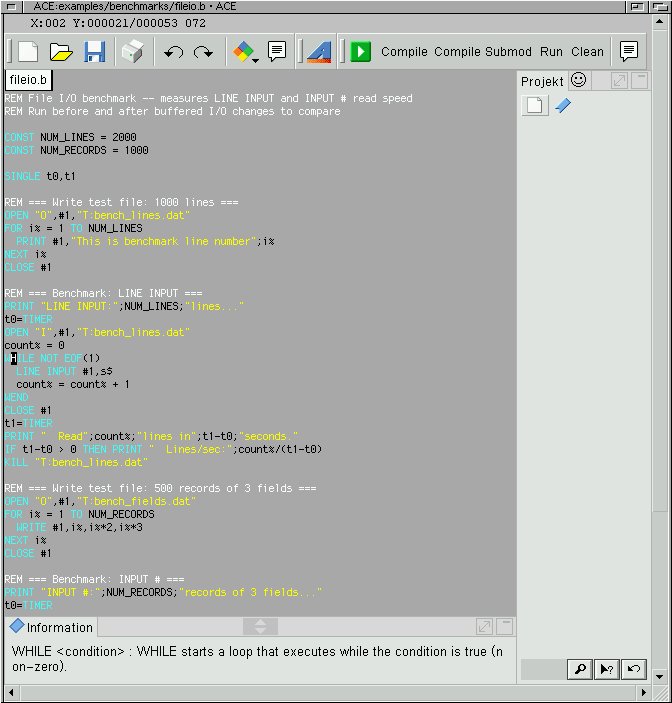
CubicIDE (also known as GoldEd Studio) is a popular programmer's editor on the Amiga. Version 2.8 ships with a CubicIDE plugin that adds:
- Syntax highlighting for ACE BASIC source files (.b, .bas)
- Quick help -- the bottom bar of the CubicIDE window shows the syntax of the BASIC command under the cursor
- Source navigation in the sidebar for quick jumping between SUBs and functions
- Toolbar buttons for compile, compile-and-run, and submodule compilation
Submodule linking is handled by the bas build script via REM #using <path> comments in your source. For example, REM #using ace:submods/mui/MUI.o at the top of your file tells bas to link the MUI submodule when compiling.
Brief Mentions
A few smaller additions worth noting:
YAP preprocessor: The legacy APP preprocessor has been replaced by YAP (Yet Another Preprocessor). YAP supports macros, conditional compilation, and include directives with a cleaner syntax. It is now the default for all
#includeand#defineprocessing.ELSEIF keyword: You can now write
IF/ELSEIF/ELSE/END IFchains without nesting. A small quality-of-life improvement that reduces indentation in multi-branch logic.Compiler refactoring: About 1,500 lines of duplicated code were removed from the compiler internals. This does not change any user-facing behavior, but it makes the codebase easier to maintain and extend going forward.
Conclusion
Versions 2.7 and 2.8 take ACE BASIC in a decidedly more modern direction. Closures and function pointers bring functional programming patterns to a language that has been purely imperative for 30 years. The List submodule demonstrates what that enables. MUI support makes sophisticated GUI applications practical. Double buffering rounds out the graphics story. And CubicIDE integration makes the development workflow smoother on the Amiga itself.
The project lives on GitHub. Bug reports and feature requests are welcome.
-
[Clamiga - Common Lisp for the Amiga]
31-07-2026 -
[ACE BASIC 3.0.1 - Variable Arrays and 68000 Compat]
14-05-2026 -
[ACE BASIC 3.0 - Classes IEEE and More]
02-03-2026 -
[ACE BASIC - Structs RTG and More]
16-02-2026 -
[Developing with AI - Understanding the Context]
13-02-2026 -
[ACE BASIC - Closures MUI and More]
10-02-2026 -
[ACE BASIC - GadTools and More]
31-01-2026 -
[ACE BASIC - AGA Screen Support]
27-01-2026 -
[Polymorphism and Multimethods]
02-03-2023 -
[Global Day of CodeRetreat - recap]
07-11-2022 -
[House automation tooling - Part 4 - Finalized]
01-11-2022 -
[House automation tooling - Part 3 - London-School and Double-Loop]
02-07-2022 -
[Modern Programming]
14-05-2022 -
[House automation tooling - Part 2 - Getting Serial]
21-03-2022 -
[House automation tooling - Part 1 - CL on MacOSX Tiger]
07-03-2022 -
[Common Lisp - Oldie but goldie]
18-12-2021 -
[Functional Programming in (Common) Lisp]
29-05-2021 -
[Patterns - Builder-make our own]
13-03-2021 -
[Patterns - Builder]
24-02-2021 -
[Patterns - Abstract-Factory]
07-02-2021 -
[Lazy-sequences - part 2]
13-01-2021 -
[Lazy-sequences]
07-01-2021 -
[Thoughts about agile software development]
17-11-2020 -
[Test-driven Web application development with Common Lisp]
04-10-2020 -
[Wicket UI in the cluster - the alternative]
09-07-2020 -
[TDD - Mars Rover Kata Outside-in in Common Lisp]
03-05-2020 -
[MVC Web Application with Elixir]
16-02-2020 -
[Creating a HTML domain language in Elixir with macros]
15-02-2020 -
[TDD - Game of Life in Common Lisp]
01-07-2019 -
[TDD - classicist vs. London Style]
27-06-2019 -
[Wicket UI in the cluster - reflection]
10-05-2019 -
[Wicket UI in the Cluster - know how and lessons learned]
29-04-2019 -
[TDD - Mars Rover Kata classicist in Scala]
23-04-2019 -
[Burning your own Amiga ROMs (EPROMs)]
26-01-2019 -
[TDD - Game of Life in Clojure and Emacs]
05-01-2019 -
[TDD - Outside-in with Wicket and Scala-part 2]
24-12-2018 -
[TDD - Outside-in with Wicket and Scala-part 1]
04-12-2018 -
[Floating Point library in m68k Assembler on Amiga]
09-08-2018 -
[Cloning Compact Flash (CF) card for Amiga]
25-12-2017 -
[Writing tests is not the same as writing tests]
08-12-2017 -
[Dependency Injection in Objective-C... sort of]
20-01-2011